

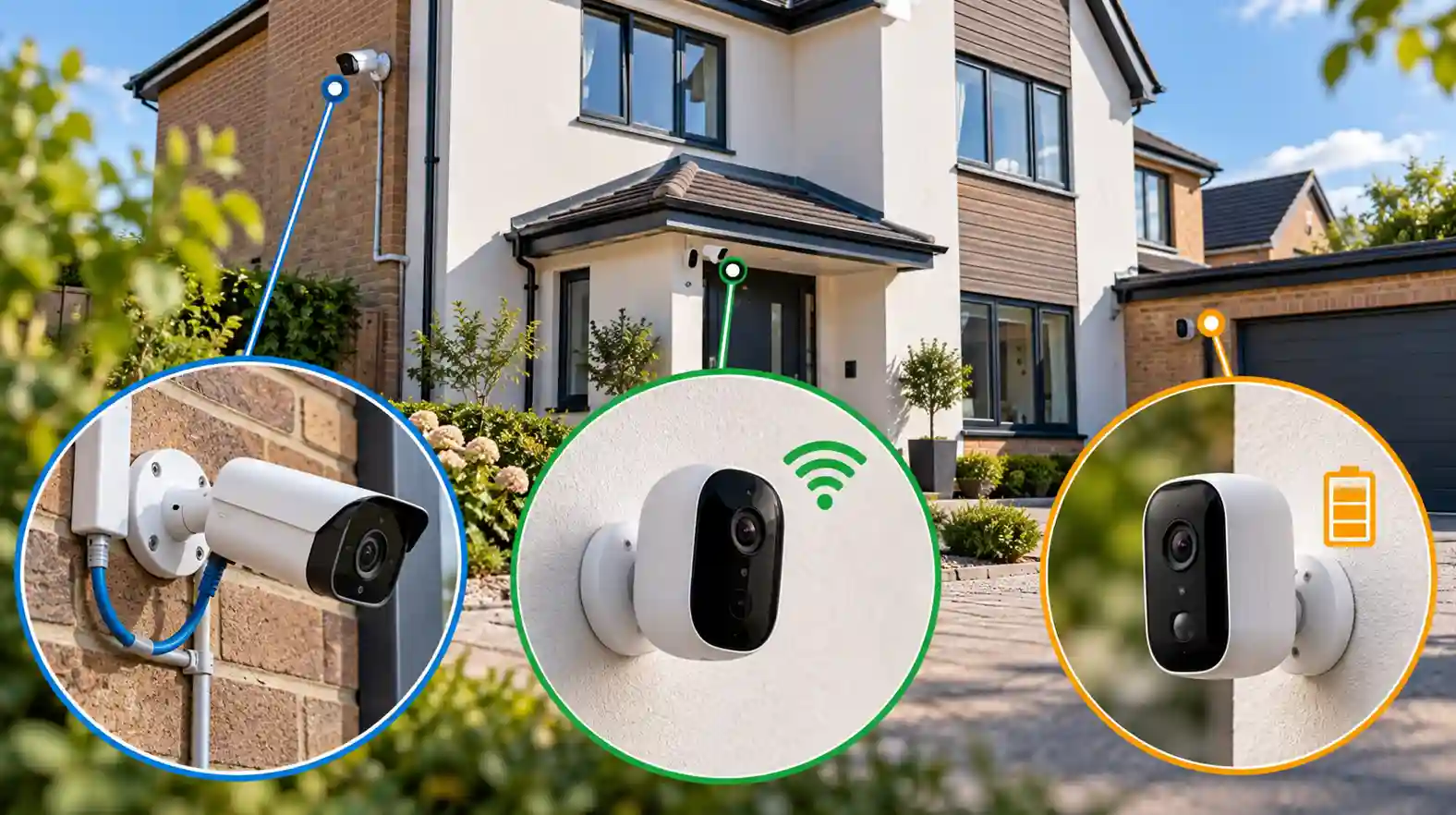
The terminology around home CCTV has a habit of collapsing three separate decisions into one confusing word. “Wireless” might mean a camera that still needs a mains socket but sends its footage over Wi-Fi. “Wire-free” might mean a battery camera that needs recharging periodically. “PoE” sounds like another piece of networking jargon but is actually one of the most reliably wired options available. None of this is explained particularly well at the point of sale, which is how people end up with an expensive camera that’s technically excellent and practically wrong for where they’ve put it.
It helps to stop thinking of CCTV systems as a single choice and start thinking of them as three separate decisions stacked on top of each other: how the camera gets power, how it sends its data, and where that data ends up being stored. Get those three right for your specific property and the actual brand becomes a much smaller decision.
Power, data and storage are three different questions
A camera’s power source and its data connection aren’t the same thing, even though marketing often implies they are. A Power over Ethernet (PoE) camera gets power over the same Ethernet cable that carries its network data back to suitable PoE equipment — genuinely one of the more elegant solutions where running a cable is feasible, because it removes both the “does it have enough charge?” question and the “is the Wi-Fi reaching it?” question in one go. Cisco has a useful explanation of how Power over Ethernet works.
A mains-powered Wi-Fi camera solves the power problem with a plug but still depends on your wireless network for its data. That means its reliability depends partly on the Wi-Fi signal actually reaching the position where the camera is installed — and exterior walls, distance from the router and the layout of the property can all matter. A genuinely battery-powered camera solves both the fixed cabling and socket problem, at the cost of needing to be taken down and recharged, or having its battery swapped, on some regular cycle.
The quickest way to make sense of the terminology is to separate the decisions:
| Decision | Typical options | The question that actually matters |
|---|---|---|
| Power | PoE, mains, battery | Can you get permanent power to the camera, or are you prepared to recharge it? |
| Data connection | Ethernet, Wi-Fi | How reliably can the camera communicate from the position where it will actually be installed? |
| Storage | NVR, microSD/local storage, cloud | Do you want footage on-site, off-site, subscription-free, or some combination of these? |
Storage is the third, separate axis. Local storage — a microSD card in the camera itself, or a dedicated recorder such as an NVR sitting inside the house — keeps footage on your own property and can avoid a recurring storage subscription. But it is vulnerable if the camera, card or recorder containing the evidence is stolen or damaged along with everything else.
Cloud storage sends footage off-site, which is genuinely valuable if a break-in could plausibly involve someone taking the camera or recorder itself. The trade-off is that it commonly comes with a subscription, depends on an internet connection for uploading footage, and leaves retention periods and some aspects of data handling dependent on the provider’s service and terms.
Some systems combine the two, retaining footage locally while also sending selected clips or backups off-site. That can remove the need to choose completely between local resilience and remote protection, although the exact arrangement varies considerably between manufacturers.
None of these three choices are locked together. You can have a mains-powered Wi-Fi camera that records to a local microSD card with no storage subscription at all. You can have a battery camera that uploads primarily to the cloud. Working out which combination actually suits your situation is the real decision — not simply “which brand?”
There is also a less obvious cost trade-off. A PoE system may cost more to install because cables have to be run to the camera positions, but once that work is done there is very little routine attention required at the cameras themselves. A battery system may be much quicker and cheaper to put up initially, but charging becomes part of owning it. Cloud storage can reduce the need for local recording hardware but may introduce a monthly or annual fee instead. The cheapest system to install is not necessarily the one that creates the least cost or inconvenience over several years.
Matching the architecture to the property
A single camera covering a front door on a terraced house is probably the easiest case, and often where a straightforward Wi-Fi doorbell or porch camera earns its reputation. If Wi-Fi coverage at the entrance is strong, there may be little benefit in installing a more complicated network simply for the sake of it. A subscription-based cloud plan can also be a perfectly reasonable trade here if the alternative is running cables through parts of the house you do not want disturbed.
Multiple external cameras around a detached house is where PoE starts to earn its higher installation cost. Running Ethernet to several fixed positions and feeding those cameras into a central recorder removes reliance on Wi-Fi coverage and wireless airtime at every camera location. That becomes increasingly useful as the number of cameras, resolution and amount of video being transmitted increase. It also gives you one recorder and one central point of management, with systems available that do not require an ongoing storage subscription once installed.
A rear garden or side return with weak Wi-Fi is the situation where wireless cameras can disappoint. A camera with an unreliable connection may be slow to open for live viewing, miss remote notifications or periodically disappear from the network. Here, a short Ethernet run — or improving wireless coverage with a properly positioned access point or mesh node — may do considerably more for reliability than spending more money on the camera itself.
A detached garage or outbuilding away from the house can make battery cameras genuinely attractive, precisely because running a cable may be expensive and disruptive. But this is where advertised battery-life figures need treating with caution. A camera repeatedly triggered by people, vehicles, animals or vegetation moving in the wind will generally have a very different workload from one watching a rarely disturbed corner.
If the outbuilding already has mains electricity, however, permanent power may still be practical even where running Ethernet all the way back to the house is not. Combining mains power with a suitable network connection can remove the need for regular battery charging. The right answer depends as much on what infrastructure is already there as on the distance from the house.
A holiday or second home changes the calculation again. Off-site storage becomes considerably more valuable because nobody may be there regularly to inspect a recorder or recover footage. Remote viewing matters more as well. But an unattended property also exposes the weaknesses of systems requiring regular battery charging, so permanent power can be just as important as cloud storage. And however good the camera is, remote access and cloud uploading still depend on that property’s broadband connection remaining available.
Wanting continuous, 24/7 recording rather than motion-triggered clips normally points towards a permanently powered system rather than a battery-first one. Battery cameras are commonly designed around event-triggered recording to conserve power. PoE or mains-powered cameras are therefore the more natural starting point for continuous recording, whether footage is being written to an NVR, another form of local storage or a compatible continuous cloud service. The important point is to check that the particular camera actually supports continuous recording; permanent power alone does not guarantee that it does.
Wanting to avoid ongoing subscriptions is really a storage decision more than anything else. Local recording, whether to an NVR, hub or camera-mounted storage, can remove the recurring cloud-storage fee, provided you are comfortable with footage remaining on the property and with whatever backup arrangements you put in place yourself.
What outages actually do to each option
It is worth thinking through failure modes before committing, because this is where architecture choices show their real character.
A PoE system recording to a local NVR can continue recording through an internet outage provided the cameras, local network equipment and recorder still have power. The internet is then primarily needed for things such as remote viewing and external notifications rather than for the basic camera-to-recorder connection.
Local recording is not exclusive to PoE, however. Some Wi-Fi cameras can also continue recording locally when broadband goes down, provided their local network and power remain available. What happens during an outage is therefore a product-level question worth checking rather than something that can safely be assumed from the words “Wi-Fi camera”.
A cloud-dependent camera cannot upload new footage while its internet connection is unavailable, although some systems may retain footage locally and synchronise it later. A power cut creates a different failure: a wired or mains-powered camera normally stops unless the relevant equipment has backup power.
A battery camera may keep operating during a household power cut, but if the router has lost power it may have no internet connection for remote viewing or cloud uploads. Whether useful footage is still retained then depends on whether that particular camera has local recording capability.
That distinction matters. “Still powered”, “still recording” and “still accessible remotely” are three different things.
A brief word on where the camera points
Whichever architecture you choose, positioning raises a separate issue. A home camera aimed solely within your own property is treated differently under data protection law from one that captures a neighbour’s property, a public area or communal space.
The Information Commissioner’s Office says that where domestic CCTV captures people outside the boundary of the user’s property, data protection law applies. Among other things, householders should avoid capturing more than is necessary, keep recordings secure and make people aware that CCTV is in use. The ICO’s guidance on domestic CCTV explains the position in more detail.
Property Front Page’s dedicated guide on what home CCTV and video doorbells can legally record covers that question properly. It is worth reading before finalising camera positions, not after.
The broader lesson is that the best CCTV system is not automatically the one with the highest resolution, longest feature list or most expensive cameras. A modest camera with dependable power, a reliable connection and storage that matches what you actually need is likely to be more useful than a technically superior one whose battery is flat, Wi-Fi connection is marginal or recordings disappear when the broadband does.
Choose the architecture first. Choose the camera second.
This article explains general considerations for choosing CCTV system architecture in the UK; specific product capabilities, battery life, storage capacity and subscription terms vary by manufacturer and should be checked against the current specification and terms of any device before purchase.